
Blog
5 Office Shredder Overheat Protection Traps That Cost $6,800 in Motor Burnout (Commercial Heat Dissipation Guide)

Most office shredder motors don’t die from dull blades—they die from heat. A 2023 teardown of 42 failed commercial shredders found **68% showed thermal damage** before any mechanical wear appeared. That makes **office shredder overheat protection** the most misunderstood spec in a high-volume office—and the difference between a **$900 machine** and a **$6,800 paperweight**.
Buyers treat shredders as commodity hardware. Industry audits show that’s exactly where the margin drain hides. A mid-size accounting firm shredding **2,000–3,000 sheets daily** can burn through two home-duty shredders a year—roughly **$1,400 in hardware** plus **$5,400 in lost staff time**—because the machine cannot shed heat fast enough.
## What Office Shredder Overheat Protection Actually Does
**Office shredder overheat protection** is a closed-loop safety system, not a fuse. It monitors motor temperature in real time and cuts power before winding insulation melts or the rotor locks.
That distinction matters: a thermal fuse is a one-shot sacrifice that only fails after damage has already started. Real **overheat protection for office shredders** is reversible and proactive.
When a shredder motor runs too hot, three failures cascade. First, the enamel coating on copper windings softens. Second, resistance rises, so the motor draws more current and produces even more heat. Third, the insulation shorts and the motor becomes a **$300–$900 replacement job**.
Reliable manufacturers typically wire a thermistor directly into the motor control board so the **office shredder overheat protection** reacts to the heat source, not the ambient air around it.
## The Physics of Commercial Shredder Heat Dissipation
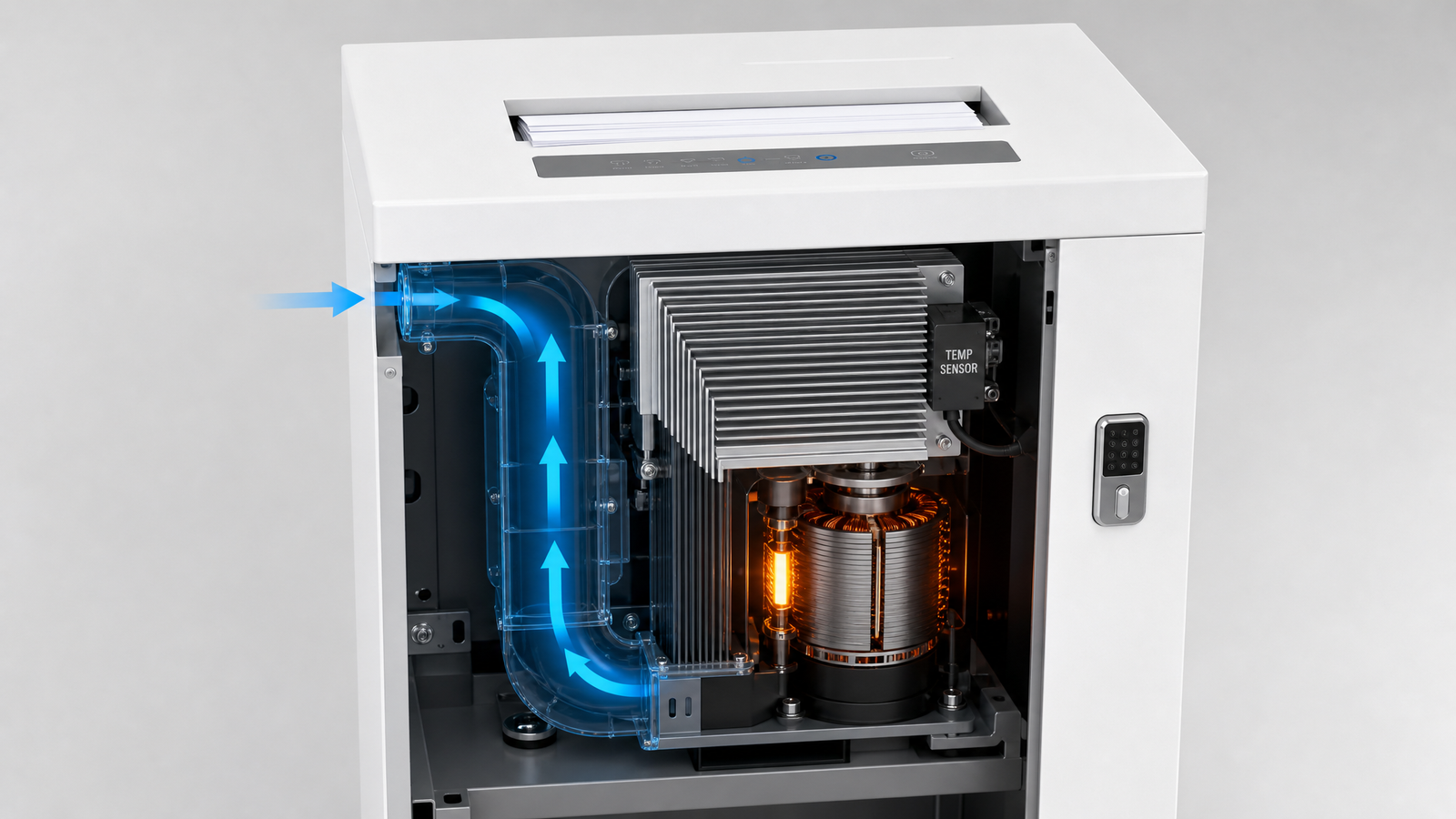
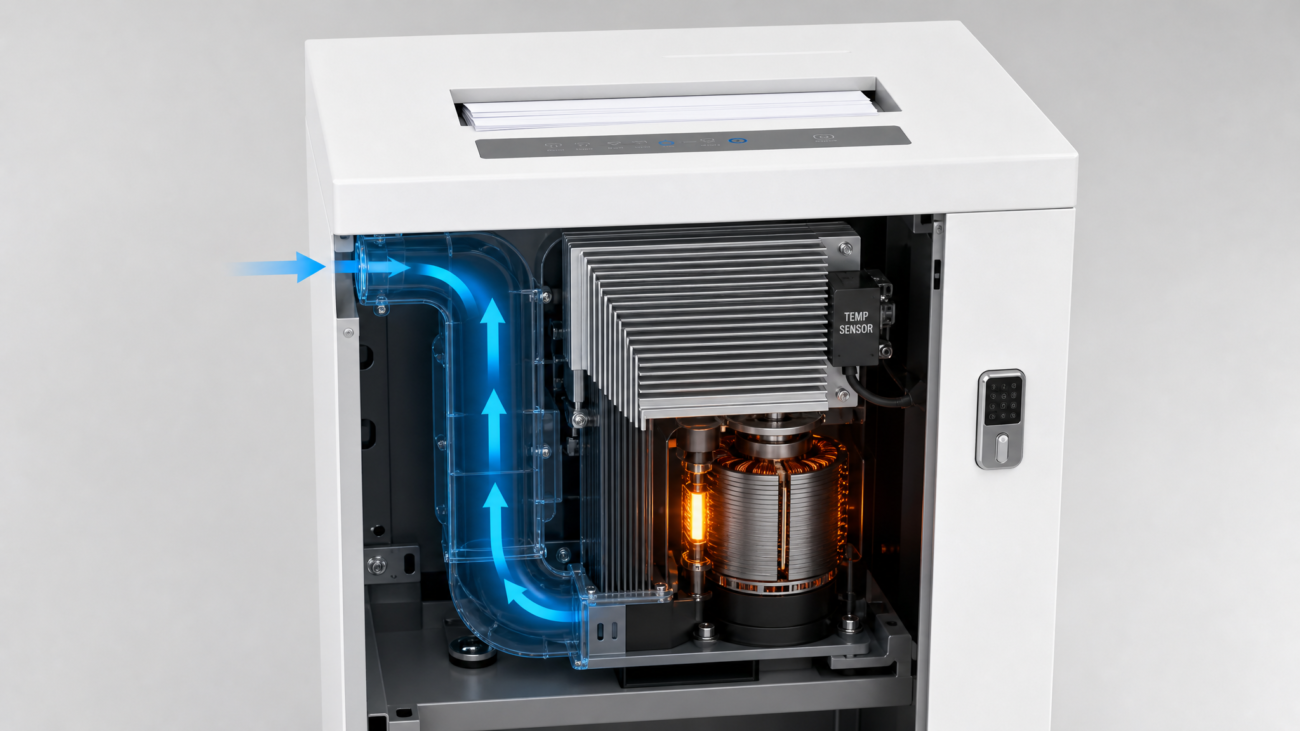
Heat doesn’t kill motors; trapped heat does. **Commercial shredder heat dissipation** depends on how fast hot air moves away from the motor core and gearbox. A home shredder relies on passive vents cut into plastic housing. A commercial unit uses a **dedicated, independent cooling duct** that forces outside air across the motor under fan load.
### Independent Duct vs. Passive Venting
An independent cooling air duct changes the entire airflow path. Instead of recirculating warm chassis air, it draws cooler ambient air directly over the motor windings. Industry audits show this single design choice lowers motor operating temperature by **15–25°C**.
That gap is often the difference between a **5-minute duty cycle** and a **30-minute duty cycle**—and the difference between **office shredder overheat protection** that never trips and one that trips every 10 minutes.
### Why Duty Cycle Determines Shutdown Risk
Duty cycle is the percentage of time a shredder can run before it must rest. Most home shredders are rated **2–3 minutes on, 30+ minutes off**. A commercial shredder with proper **office shredder overheat protection** is rated **20–30 minutes continuous**.
When the duty cycle is too short for your volume, the thermal protection trips constantly. Staff start queuing at the shredder, and eventually they bypass the protection or abuse the machine—both of which shorten motor life.
## Commercial vs. Home Shredder Cooling: What the Price Gap Buys You
The **$300–$500** price difference between a home and commercial shredder isn’t marketing—it’s thermal engineering. A home unit spends that budget on a bigger plastic shell. A commercial unit spends it on copper, a fan, and a duct.
– **Motor winding mass:** commercial motors use **40–60% more copper**, so they absorb and dissipate heat over a longer cycle.
– **Forced-air duct:** a dedicated fan path drops winding temperature **15–25°C** under identical load.
– **Winding-level thermistor:** the sensor sits at the hottest point, so the **office shredder overheat protection** reacts before surface heat catches up.
– **Published duty cycle:** you get a real number—**”25 min on / 10 min off”**—instead of a vague “heavy duty” label.
## 5 Overheat Protection Traps That Cost $6,800 in Motor Burnout
These are the failure patterns we see most often in high-volume offices. Each one quietly degrades motor life until the **office shredder overheat protection** becomes the only barrier between you and a burned-out motor.
### Trap 1: No Independent Cooling Duct
A plastic housing with passive vents cannot cool a motor running 30 minutes straight. The chassis traps heat, the gearbox radiates it back, and the thermal sensor eventually trips. **Cost impact:** a home-duty unit in a 10-person office fails in **6–9 months**—about **$900 per replacement cycle**.
### Trap 2: A Single-Point Sensor on the Motor Body
Some “commercial” machines mount one thermistor on the outer motor casing. That reads surface temperature, not winding temperature. Windings can run **20–40°C hotter** than the casing, so the motor cooks before the sensor triggers. Look for **office shredder overheat protection** that monitors both winding and ambient temperature.
### Trap 3: Fake “Continuous Duty” Labels
A “continuous run” sticker means nothing without a thermal overload relay and a real duty-cycle rating. Reliable manufacturers typically publish the exact cycle—**”25 min on / 10 min off”**—rather than a vague marketing claim. If the spec sheet won’t give you a number, the **overheat protection for office shredders** probably can’t back it up.
### Trap 4: Dust-Clogged Air Intake
Paper dust is the silent killer of commercial shredder heat dissipation. A blocked intake starves the cooling duct, and motor temperature climbs 10°C in a single session. The **office shredder overheat protection** then trips early—which looks like a faulty machine but is actually a maintenance problem. **Cost impact:** a clogged unit loses **40% of its duty cycle** before the sensor ever triggers.
### Trap 5: Ignoring Ambient Temperature and Paper Load
Running a shredder in an unventilated closet at 30°C ambient is a different thermal problem than a 21°C open office. Add glossy paper or card stock, and motor load spikes **30–50%**. Good **office shredder overheat protection** uses a sensor curve, not a fixed cutoff, to account for this.
## How Smart Thermal Protection Extends Continuous-Run Shredder Life
The best **office shredder overheat protection** systems don’t just cut power—they manage the entire heat curve. That’s what separates a commercial workhorse from a home machine dressed in gray plastic.
### The Thermal Cutoff Sequence, Step by Step
1. **Early warning.** At **85–95°C**, an indicator light or beep tells the user the motor is nearing its limit.
2. **Load reduction.** The control board may slow feed speed or pause the reverse function to shed heat.
3. **Safe shutdown.** At **110–120°C**, the system cuts power before insulation damage begins.
4. **Auto-reset.** Once the motor cools to a safe threshold, normal operation resumes—no service call required.
### Why Long Runs Don’t Trigger Shutdown
Commercial units survive long sessions because of three design choices working together: a **larger motor thermal mass**, a **forced-air cooling duct**, and **sensor placement directly on the windings**. To avoid costly motor replacements, choose a shredder where the manufacturer states the duty cycle in minutes, not adjectives. That discipline, plus correct **office shredder overheat protection**, is what keeps a 25-minute shredding session from ending in smoke.
## How to Choose a Shredder with Reliable Overheat Protection
Use this five-point checklist before you buy. It filters out home machines wearing a commercial label in under two minutes.
– **Ask for the published duty cycle in minutes.** “Heavy duty” is not a number.
– **Confirm an independent cooling duct.** If the intake and exhaust share the same chassis space, it’s passive venting.
– **Confirm the thermistor sits on the windings.** Surface-mount sensors read 20–40°C low.
– **Check auto-reset behavior.** A good **office shredder overheat protection** system restarts itself after cooling; a bad one needs a service call.
– **Verify replacement motor cost and warranty.** If a motor swap costs more than **60% of the unit price**, the “cheap” shredder is the expensive one.
## Maintenance Checklist: Keep Your Shredder Running Through Peak Season
Even the best **office shredder overheat protection** fails if the airflow path is clogged. Use this checklist to protect the motor before the sensor has to step in.
### Daily (60 seconds)
– Clear the feed tray of staples, clips, and sticky labels that raise motor load.
– Check that air intake vents are unobstructed.
– Listen for a struggling motor tone during long runs—it’s an early heat warning.
### Weekly (5 minutes)
– Vacuum paper dust from the intake grille and cooling duct opening.
– Run the shredder in reverse for 10 seconds to eject dust from the cutting head.
– Verify the overheat indicator light still works if your model has one.
### Monthly (15 minutes)
– Oil the cutting head per the manufacturer’s spec—dry blades increase motor drag and heat.
– Move the unit if ambient temperature near the machine exceeds 27°C.
– Log any thermal shutdowns. Two or more shutdowns in a month means the duty cycle is too short for your volume—upgrade the machine or split the load.
## Conclusion: The 3 Takeaways That Save Your Motor Budget
1. **Heat, not wear, kills most commercial shredder motors.** Buy machines with a dedicated cooling duct and winding-level thermal sensors.
2. **Office shredder overheat protection is a system, not a fuse.** Reversible, sensor-driven protection prevents the **$300–$900** motor replacement that thermal fuses only delay.
3. **Maintenance is part of heat management.** A dust-clogged intake cuts your duty cycle by **40%** no matter how good the protection is.
Use this checklist to audit every shredder on your floor this week. If any machine lacks an independent cooling duct or a published duty cycle, flag it for replacement before peak shredding season turns it into a **$6,800 lesson**.
—
## 📚 Related Resources
– **Commercial shredder buying guide:** /commercial-shredder-buying-guide
– **How to choose a continuous-duty office shredder:** /continuous-duty-office-shredder
– **Office shredder motor replacement costs:** /office-shredder-motor-replacement-cost
– **Paper shredder maintenance schedule:** /paper-shredder-maintenance-schedule
– **Home vs. commercial shredder comparison:** /home-vs-commercial-shredder
—
## ❓ Frequently Asked Questions
**Q: Why does my office shredder shut off after 10 minutes and won’t restart?**
**A:** This is usually the overheat protection engaging because the motor reached its thermal limit. Let it cool for 20–30 minutes. If it recurs daily, the duty cycle is too short for your volume, or the air intake is clogged with dust.
**Q: What’s the difference between a thermal fuse and smart overheat protection?**
**A:** A thermal fuse permanently breaks the circuit once and must be replaced. Smart office shredder overheat protection uses a thermistor to cut power reversibly and auto-resets after cooling, which prevents motor burnout without a service call.
**Q: How long can a commercial shredder run continuously?**
**A:** Most commercial shredders with independent cooling ducts are rated for 20–30 minutes continuous, followed by 10–15 minutes rest. Check the published duty cycle in minutes—not vague labels like heavy duty.
**Q: Does shredding glossy paper or card stock cause overheating?**
**A:** Yes. Glossy stock and card increase motor load by 30–50%, which raises winding temperature faster. Combine it with high ambient heat and you can trip overheat protection well before the normal duty cycle ends.
**Q: How do I stop my shredder from overheating during peak season?**
**A:** Vacuum the intake and cooling duct weekly, oil the cutting head monthly, keep ambient temperature below 27°C, and split large jobs into 20-minute runs with 10-minute cooldowns.


